微軟Win8.2傳言要來了!好期待

windows 8.2 真的要來了

【聯合新聞網/記者楊又肇/報導】

微軟才在今年10月下旬釋出Windows 8.1更新,近期也有不少消息紛紛指出微軟將在近期內釋出Windows 8.2更新內容,主要將針對重新回歸的「開始」按鍵持續作調整,可能恢復接近過去Windows 7的使用體驗,同時也可能統整現有Windows軟體市集。

繼先前傳出微軟可能整併Windows Store、Windows Phone Store兩組軟體市集後,陸續也有關於Windows 8.2更新即將釋出的消息被討論。其中,不少說法認為微軟將進一步針對重新回歸的「開始」按鍵進行調整,或許將使其按下後不會直接切喚為動態磚介面,而可能是以跳出式選單顯示電腦安裝應用程式,藉此接近Windows 7時的操作體驗。

此外,針對伴隨Windows 8.1所釋出的IE 11瀏覽器,微軟也將透過最佳化提昇其效能表現,但大致上不會有明顯差異;而針對檔案管理部分,微軟也有可能將檔案總管功能予以回歸,讓Windows 8動態磚環境下能有更便利的檔案管理。

不過,若微軟確實將於Windows 8.2強化「開始」按鍵,使其操作體驗接近原有Windows 7,是否意味微軟可能在動態磚介面的市場策略妥協,可能還是要以微軟於後續說明為主。

至於Windows 8.2更新實際釋出時間,目前有可能安排在2014年1月左右,同樣將以免費更新提供,讓合法使用Windows 8、Windows 8.1的使用者下載升級。

而針對先前傳聞微軟可能整併Windows Store、Windows Phone Store服務,讓使用者能透過單一軟體市集下載應用程式。不過,先前消息也傳出微軟可能放慢整併腳步,擬於兩年時間整併兩種軟體市集。


全文網址: 微軟傳明年1月釋出Win 8.2 強化開始按鍵 | 軟體趨勢 | 軟體學園 | udn數位資訊 http://mag.udn.com/mag/digital/storypage.jsp?f_ART_ID=487163#ixzz2nExvNsPR
Power By udn.com

Windows 8.2 release date, news and rumors

http://www.extremetech.com/computing/172468-the-start-menu-will-return-in-new-desktop-optimized-version-of-windows-8-2

With Windows 8.1 out of the way, Microsoft has now begun work on Windows 8.2. According to sources close to the development Windows 8.2, dubbed Threshold, Microsoft will bring Windows, Windows Phone and Xbox One closer together — to the threshold, if you will, of being a fully unified OS. Furthermore, again according to insider sources, Windows 8.2 will introduce a “traditional desktop” SKU that is optimized for mouse-and-keyboard Desktop users and resurrects the original Start menu.

This information, of course, comes from Mary Jo Foley. According to her sources, which are usually pretty accurate, Threshold is Microsoft’s next wave of software updates, which follow on from Blue (Windows 8.1, Windows Phone 8.1, etc.) The code name is an odd one — Threshold is the planet from the original Halo game. Some tech bloggers have tried to infer some functional data from the code name, but it probably means nothing (just like Cortana, Microsoft’s Siri rival, or Blue). Threshold is apparently a wave of software updates that will more closely knit together the user experience of Windows, Windows Phone, and Xbox One. This fits in well with our analysis that Microsoft will eventually unify its various platforms into a single OS, finally giving it the software ecosystem that it needs, if it ever wants to crack the iOS/Android mobile computing duopoly.

WIN8更新update失敗錯誤代碼8024A000

無法更新


錯誤代碼8024A000


每次開機都會顯示要更新安裝


解決方式


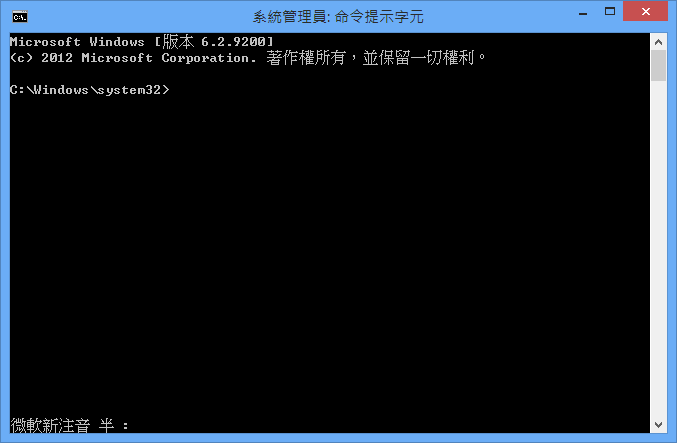
點選「命令提示字元(系統管理員)」


鍵入下面指令


net stop wuauserv


net stop bits


net stop cryptsvc


ren %systemroot%\SoftwareDistribution SoftwareDistribution.old


regsvr32 c:\windows\system32\vbscript.dll /s


regsvr32 c:\windows\system32\mshtml.dll /s


regsvr32 c:\windows\system32\msjava.dll /s


regsvr32 c:\windows\system32\jscript.dll /s


regsvr32 c:\windows\system32\msxml.dll /s


regsvr32 c:\windows\system32\actxprxy.dll /s


regsvr32 c:\windows\system32\shdocvw.dll /s


regsvr32 wuapi.dll /s


regsvr32 wuaueng1.dll /s


regsvr32 wuaueng.dll /s


regsvr32 wucltui.dll /s


regsvr32 wups2.dll /s


regsvr32 wups.dll /s


regsvr32 wuweb.dll /s


regsvr32 Softpub.dll /s


regsvr32 Mssip32.dll /s


regsvr32 Initpki.dll /s


regsvr32 softpub.dll /s


regsvr32 wintrust.dll /s


regsvr32 initpki.dll /s


regsvr32 dssenh.dll /s


regsvr32 rsaenh.dll /s


regsvr32 gpkcsp.dll /s


regsvr32 sccbase.dll /s


regsvr32 slbcsp.dll /s


regsvr32 cryptdlg.dll /s


regsvr32 Urlmon.dll /s


regsvr32 Shdocvw.dll /s


regsvr32 Msjava.dll /s


regsvr32 Actxprxy.dll /s


regsvr32 Oleaut32.dll /s


regsvr32 Mshtml.dll /s


regsvr32 msxml.dll /s


regsvr32 msxml2.dll /s


regsvr32 msxml3.dll /s


regsvr32 Browseui.dll /s


regsvr32 shell32.dll /s


regsvr32 wuapi.dll /s


regsvr32 wuaueng.dll /s


regsvr32 wuaueng1.dll /s


regsvr32 wucltui.dll /s


regsvr32 wups.dll /s


regsvr32 wuweb.dll /s


regsvr32 jscript.dll /s


regsvr32 atl.dll /s


regsvr32 Mssip32.dll /s


net start wuauserv


net start bits


net start cryptsvc


exit


重新執行windows更新


這時候就可以恢復正常了

恢復WIN8刪除delete的提示訊息

windows 8最大進步之一就是把確定要刪除檔案的訊息拿掉了


現在可以直接從檔案總管刪除檔案放到資源回收桶


但是有些人還是很懷念提示訊息


想要恢復WIN8刪除delete的提示訊息


一種做法就是點選shift加上delete


按shift+delete就會問你了


只是不會經過資源回收桶XD


又或者在資源回收桶按右鍵


找到內容


將顯示確認刪除的對話方塊打勾就可以了

移動Windows 8 的用戶帳號 UserProfile 目錄位置實作步驟教學

改變windows 8的預設使用者位置


移動Windows 8 的用戶帳號 UserProfile 目錄位置實作步驟教學


1.登入系統管理員administrator帳號


2.修改系統機碼將新增用戶帳號目錄指向 d:\ 硬碟


3.以系統管理員administrator身分執行regedit登錄編輯程式:


尋找機碼 HKEY_LOCAL_MACHINE\SOFTWARE\Microsoft\Windows NT\CurrentVersion\ProfileList


修改三個預設機碼如下:


ProfileDirectory 預設由 %SystemDrive%\Users 修改為 d:\


Default 預設由 %SystemDrive%\Users\Default 修改為 d:\Default


Public 預設由 %SystemDrive%\Users\Public 修改為 d:\Public

快速變更Windows 8動態磚尺寸大小size

win8有兩種size的動態磚


一種是只占用1格的小動態磚


一種是兩倍大,占用2格的大動態磚。


首先我們要知道並非每個動態磚都可以放大或縮小


大部分的都是只占用1格的小動態磚


只有部分為了可以顯示更多即時資訊在上面


所以能夠變成兩倍大,占用2格的大動態磚


我們只需要在動態磚上按下滑鼠右鍵


動態磚會出現一個勾勾


最下面會有功能選項


可以按下【放大】

快速學會使用bcdedit將win8【安全模式】加到開機選單中safe mode

我們這次要要來學習將【安全模式】加到開機選單


以後每次開機都可以跳出開機選單


讓我們直接選擇以哪種方式開機


輸入指令 bcdedit /v


檢查一下現在的開機設定資料


找到開機設定識別碼【identifier】欄位


複製開機設定 Bcdedit /copy 【identifier】/d "安全模式開機設定說明"


輸入 Bcdedit /set 【identifier】 safeboot Minimal 設定安全模式開機


Minimal是最基本的安全模式


另外還有Dsrepair(AD修復模式)和包含網路的Network安全模式

學會用control userpasswords2設定Windows 8自動登入

直接按下視窗鍵+R


接著輸入「control userpasswords2」就會開啟「User Accounts」


請選擇要自動登入的帳號


取消「Users must enter a user name and password to use this compute」的勾選,按下〔OK〕


這個命令其實和netplwiz(
http://win8.toshit.com/2012/12/windows-8windows-81autologon.html)


這篇文章一樣


都可以取消必須輸入使用者名稱和密碼的登入動作

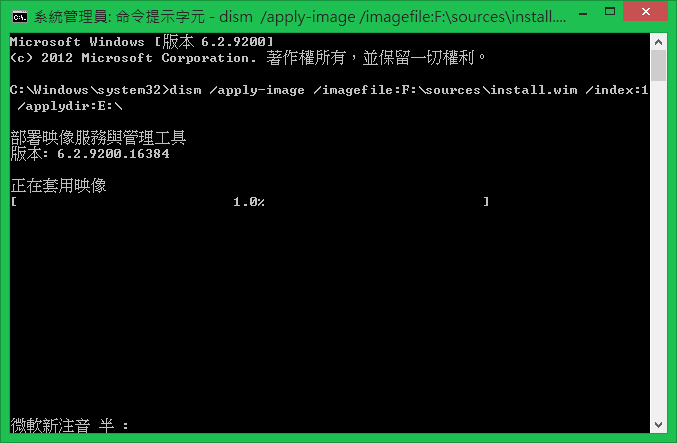
學會使用win8的dsim部署映像服務與管理工具

Windows 7就出現的dsim部署映像服務與管理工具


我們先來看看官方的說明


部署映像服務與管理(DISM) 是一種命令列工具,可用以服務Windows(R) 映像或是準備Windows 預先安裝環境(Windows PE) 映像。它取代Windows Vista® 中包含的封裝管理員(Pkgmgr.exe)、PEimg 與Intlcfg。包含在這些工具的功能現在已合併成一個工具(DISM.exe),而且已新增新功能來改善離線服務的經驗。


好處


DISM 可用來服務Windows Vista Service Pack 2 (SP2)、Windows Vista SP1 與Windows Server® 2008。它提供封裝管理員所提供的功能。DISM 與Windows® 7 和Windows Server® 2008 R2 搭配使用時,提供額外的功能。


您可以使用DISM 執行下列動作:


新增、移除和列舉封裝。


新增、移除和列舉驅動程式。


啟用或停用Windows 功能。


根據Unattend.xml 回應檔案的offlineServicing 區段套用變更。


設定國際設定。


將Windows 映像升級到不同的版本。


準備Windows PE 3.0 映像。


利用較佳的記錄功能。


服務較舊的Windows 版本,例如Windows Vista SP2、Windows Vista SP1 與Windows Server 2008。


服務所有的平台(32 位元、64 位元及Itanium)。


從64 位元主機服務32 位元映像,以及從32 位元主機服務64 位元映像。如需相關資訊,請參閱本主題稍後的<限制>小節。


001.png


002.png


001.png